
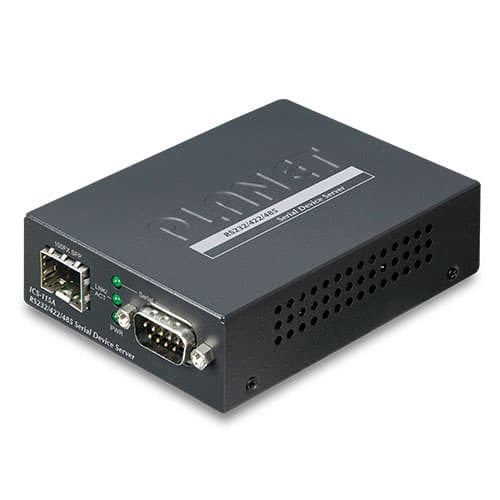
Vista 1 de 3. Selecciona una miniatura para ampliarla.
ICS-115A — RS232/RS422/RS485 Serial Device Server with 1-Port 100BASE-FX SFP
RS232/RS422/RS485 Serial Device Server with 1-Port 100BASE-FX SFP
Confirma disponibilidad, instalación y entrega con un asesor.
Descripción
Cost-effective Solution for RS232/422/485 Serial-to-Ethernet Application PLANET ICS-115A Serial Device Server is specially designed to convert RS232, RS422 or RS485 serial communication to Fast Ethernet networking to extend the network distance efficiently and inexpensively. There is one 100BASE-FX single-mode/multi-mode media available in the ICS-115A and its operating temperature ranges from -10 to 60 degrees C for your network needs. The ICS-115A is a time-saving and cost-effective solution for users and system integrators to quickly transform their serial devices into the Ethernet network with no need of replacing the existing serial devices and software system. Extending Distance The ICS-115A is able to extend the distance of deploying serial equipment and hosts. The selectable fiber-optic cables on the basis of distance are provided. Therefore, this product will perfectly satisfy the diverse demands while providing reliable and efficient network solutions based on the distance and budgets of installation. Remote Management As the ICS-115A provides an easy serial-to-Ethernet connectivity and connection to a TCP/IP network, the remote network system can thus be managed efficiently via its Web, telnet and VCOM management interfaces. It supports both application and serial operation modes for alarm or IP address connection, which saves the network administrator’s time in detecting and locating network problems without visual inspection of the cabling and devices. Multiple connection options are available for large networking environment as well. Easy Chassis Installation The ICS-115A can be used as a stand-alone unit or a slide-in module to PLANET Media Converter Chassis (MC-700 and MC-1500 chassis). The media chassis can assist in providing DC power to the ICS-115A and can be DIN-rail or wall mounted for efficient use of cabinet space, without the need of replacing the existing serial equipment and software system. Applications Access Control System – Traditional System Application Most of the enterprises and government use access control plate and Mifare or RFID to authorize entrance identity. Traditionally, the access control machines use RS232 or RS485 serial interface with their cables connecting to login server. By applying the ICS-115A Serial Device Server, the access control machine is able to extend the network over longer distances via Ethernet interfaces. In addition, the ICS-115A can be linked to an xDSL router to get the internet access capability so that the access control can be set and monitored over the internet. Process Control To monitor, configure and manage the robotic conveyer including other production machines, PLC (programmable logical control) is required to drive the above manufacturing process. The ICS-115A can be set to the TCP server mode and connected to the PLC. Thus, the administrator can configure and set command settings through Fast Ethernet intranet to remotely control the PLC, without having to stand by the I/O machine. RTU Data Collect – UDP Mode Connect with RTU (remote terminal unit) to collect and monitor the data of waves, signal and power utilization. The ICS-115A can be used to set up UDP mode and send data over Fast Ethernet to local server or over Internet to remote server automatically. Surveillance Motion Control – Pair Connection Mode Using pair connection mode via the fiber optic patch cord, the ICS-115A can extend the distance of the deployed devices via RS232, RS422 and RS485 interfaces, making the remote management of these devices from the monitoring center easier and efficient. Key Features Serial Interface One DB9 interface supports RS232, 2-wire RS485, 4-wire RS485 and RS422 operation Asynchronous serial data rates up to 921600bps Data mode includes VCOM, RFC2217, TCP Server, TCP Client, UDP, Remote Pair, Modbus converter server / client and Serial Telnet modes Ethernet Port 1-port 100BASE-FX SFP slot Management IPv4 and IPv6 dual stack management Remote Management Interfaces - IP-based Web management - Telnet console management - Windows-based VCOM utility supports searching, monitoring and configuration setting IP NTP (Network Time Protocol) Standard TCP/IP interface and versatile operation modes Software Protocol supports ICMP, TCP/IP, UDP, HTTP server, DHCP client, Telnet server/client Serial Operation mode selected via management interface Pair Connection mode for connecting two serial devices over a network Allows a maximum of 4 hosts to be accessed as TCP client mode Firmware upgrade via HTTP protocol Accessible IP security control to prevent illegal users Event notification - Remote syslog server - SNMP trap DHCP client for IP address assignment PLANET Smart Discovery utility automatically finds the client devices on the network Case and Installation Compact size for easy Installation - Standalone -- Wall mountable or DIN-rail mounting (optional accessory) - Co-works with PLANET MC family Media Chassis (MC-700/1500) External power adaptor 5V DC, 2A max. Supports 6000 VDC Ethernet ESD protection -10 to 60 degrees C operating temperature Supports extensive LED indicators for network diagnosis Reset button for resetting to factory default
Especificaciones técnicas
- Serial Port
- 1 x DB9 male
- Serial Standards
- RS232/RS422/4-wire RS485/2-wire RS485
- Baud Rate (Data Rate)
- 50bps to 921Kbps
- Data Bits
- 5, 6, 7, 8
- Stop Bit
- 1, 1.5, 2
- Parity Type
- Odd, Even, None, Space, Mark
- Flow Control
- RTS/CTS and DTR/DSR (RS232 only) XON/XOFF
- Signals
- RS232: TxD, RxD, RTS, CTS, DTR, DSR, DCD, GND RS422: Tx+, Tx-, Rx+, Rx-, GND 4-wire RS485: Tx+, Tx-, Rx+, Rx-, GND 2-wire RS485: Data A (+), Data B (-), GND
- Pin Assignment
- Pin RS232 RS422 RS485-4W RS485-2W 1 DCD TxD+ -- 2 RxD TxD- -- 3 TxD RxD- Data- 4 DTR RxD+ Data+ 5 GND GND GND 6 DSR -- -- 7 RTS -- -- 8 CTS -- -- 9 -- -- --
- Pin
- RS232 | RS422 RS485-4W | RS485-2W
- 1
- DCD | TxD+ | --
- 2
- RxD | TxD- | --
- 3
- TxD | RxD- | Data-
- 4
- DTR | RxD+ | Data+
- 5
- GND | GND | GND
- 6
- DSR | -- | --
- 7
- RTS | -- | --
- 8
- CTS | -- | --
- 9
- -- | -- | --
- Ethernet Ports
- 1 x SFP
- Standard
- 100BASE-FX
- Distance
- 2km to 120km, vary on SFP modules
- ESD Protection
- 6KV
- Dimensions (W x D x H)
- 94 x 70.3 x 26.2mm
- Weight
- 185g
- LED Indicators
- System: Link SFP: Link/Active Serial Port: Active
- Power Requirements
- External Power Adaptor 5V DC, 2A max.
- Power Consumption
- 5.5 watts (max)
- Material
- Metal
- Installation
- Standalone, wall-mount, and DIN-rail kit (optional)
- Reset Button
- < 5 sec: System reboot > 5 sec: Factory default
- Compatible Media Converter Chassis
- MC-700/MC-1500/MC-1500R
- Management Interfaces
- Web management Telnet Console management Windows-based VCOM Utility management SNMPv1, v2c / SNMP Trap UNI-NMS monitoring PLANET Smart Discovery Utility
- IP Version
- IPv4 and IPv6
- Operation Mode
- ■ TCP Server / TCP Client ■ UDP Client ■ Virtual COM ■ RFC2217 ■ Telnet Server ■ Pair Connection – Remote (Slave) ■ Pair Connection – Local (Master) ■ Modbus converter server / client
- Virtual COM Utility Platform Supports
- Windows-based Only: Windows XP Windows Server 2003 Windows 7 Windows Server 2008 Windows 8 (Must install the latest version of WinPcap) Windows Server 2012 (Must install the latest version of WinPcap) Windows 10
- Fault Alarm
- Record: System log / SNMP trap
- Time
- NTP
- Security
- Accessible IP (white list)
- SNMP
- SNMP v1 and v2c
- Regulatory Compliance
- FCC Part 15 Class A, CE Certification Class A
- Standards
- IEEE 802.3u 100BASE-FX RFC 768 UDP RFC 793 TFTP RFC 791 IP RFC 792 ICMP RFC 854 Telnet RFC 958 NTP RFC 1908 SNMPv2c RFC 2068 HTTP RFC 2131 DHCP Client RFC 2732 Format for Literal IPv6 Addresses in URL's RFC 3315 DHCPv6 Client RFC 3513 IPv6 Addressing Architecture RFC 4443 ICMPv6 EIA/TIA RS232/422/485
- Regulatory Approval
- RoHS
- Operating Temperature
- -10 ~ 60 degrees C
- Storage Temperature
- -10 ~ 70 degrees C
- Humidity
- 5 ~ 95% (non-condensing)