
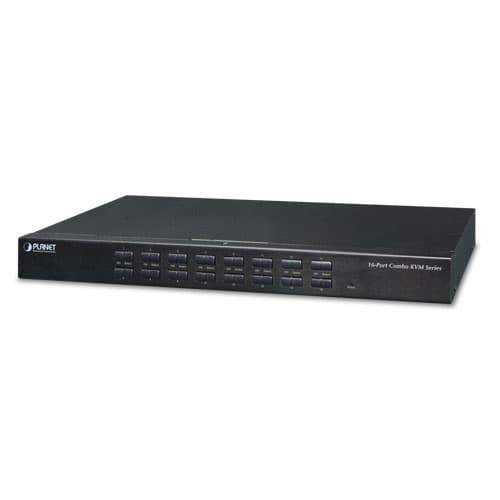
Vista 1 de 3. Selecciona una miniatura para ampliarla.
IKVM-210-16 — 16-Port Combo IP KVM Switch
16-Port Combo IP KVM Switch
Confirma disponibilidad, instalación y entrega con un asesor.
Descripción
Remotely Access your Servers from Anywhere PLANET offers an ideal enterprise 16-port KVM switch solution for company server room or testing facilities. With the innovative IP-based technology, PLANET has turned the traditional KVM switches into true networking devices. The IKVM-210-16 captures, digitizes and compresses video signal, and then transmits it with keyboard and mouse signals through IP network. Multiple remote sites can monitor the same PC server simultaneously. Multiple Operating Systems Supported The IKVM-210-16 is the most cost-effective and simple solution for controlling a group of PCs in the network. Multiple computers can be managed via only one single set of monitor, keyboard and mouse directly. No software drivers or system configuration are required. iMac, Power Mac and Sun systems are also supported. Remote Key Combination You could set the multiple key combinations at IKVM Series. When you open IKVM software at remote client, you could use these key combinations to control these local PCs with a different OS via the internet. Computer Switching There are three convenient methods to access any computer connected to the installation: Port select button Hotkeys on keyboard OSD (on screen display) at local client and remote client Perceptive LED Display You could check the computer status on the front LED of the IKVM-210-16. "Red" indicates that a computer is connected to the corresponding port and "Green" indicates that the computer connected to the corresponding port has focus. Security Protection The two-level password security only authorizes up to one user and an administrator with a separate profile for each user. Data encryption options include AES, DES and 3DES, and they can be selected for keyboard, mouse and video signals. Powerful Mouse/Keyboard Support In the present computer applications, a mouse has become an indispensable device. The IKVM-210-16 fully supports all models of PS/2 mice on the market. The KVM also supports the PS/2 keyboard port of code set 1/2/3 and further allows you to use the KVM for all kinds of servers, computers or their combination. Applications Remote Management via Network With PLANET IKVM-210-16, network administrators can control a server room locally or remotely through Internet. No additional software or license fee is needed; multiple users can securely access remote server by using a standard web browser to create an HTTP connection. Cascade Operation The IKVM-210-16 is easy to install for controlling up to 16 computers/servers. Furthermore, sixteen KVM switches can be cascaded to enable to control up to 256 servers. Key Features Hardware 1U rack-mount size and desktop design Standalone machine controls up to 16 sets of computers Up to 2 levels can be cascaded and up to 256 computers can be controlled Front panel status LEDs give a clear indication of the active computers Security Two-layer password security protection DES, AES and 3DES for data encryption Management Auto scan mode for monitoring computers Requires no additional software or hardware Computer selection via Port Select Button, Hotkey and On Screen Display (OSD) Hot pluggable: Add or remove computers without having to power down the switch QVS (Quick View Setting): Quickly select your computer by naming its model or serial number Remote Access Remotely control PC via TCP/IP and a built-in 10/100/1000Mbps Ethernet port High Video Quality: Resolution up to 2048 x 1536 (local side) or 1920 x 1080 (remote side) Sends the key combinations to a remote computer Administrator and multiple users with password protection Use of the absolute synchronistical technology of mouse to ensure the accuracy of the Windows operating system Expedient bandwidth control Compatibility Multiplatform support -- Windows, Linux and Sun Multibrowser support (IE, Chrome, Firefox) Supports Microsoft Intellimouse, Logitech Net Mouse and other third-party’s PS/2 mice
Especificaciones técnicas
- Number of Ports
- 16 D-sub ports (15-pin)
- Maximum Control of PCs
- 256 computers with 16 cascaded KVM switches (KVM-210-16)
- PC Ports
- Keyboard: PS/2 female + USB type A female Mouse: PS/2 female + USB type A female Video: 16 D-sub ports (15 female)
- Keyboard
- : PS/2 female + USB type A female
- Mouse
- : PS/2 female + USB type A female
- Video
- : 16 D-sub ports (15 female)
- Console Ports
- Keyboard: PS/2 female + USB type A female Mouse: PS/2 female + USB type A female Video: 1 D-sub port (15 female)
- Video
- : 1 D-sub port (15 female)
- LED
- On Line: 16 ( Red ) Selected: 16 ( Green )
- On Line
- : 16 ( Red )
- Selected
- : 16 ( Green )
- Button
- Reset: 1 reset button Select: 16 select buttons
- Reset
- : 1 reset button
- Select
- : 16 select buttons
- Remote Console
- 1 RJ45 port for 10/100/1000BASE-T
- Video Resolution
- Local side: 2048 x 1536 (max) Remote side: 1920 x 1080 (max)
- Housing
- Metal
- Dimensions (W x D x H)
- 432 x 155 x 44 mm
- Weight
- 2.22kg
- Power Requirement
- 9V DC, 1A
- Installation
- 1U rack-mountable, desktop
- Supported Protocol
- TCP, IP, HTTP
- Client Software
- IPKVM Software
- PC Selection
- Port select button Hotkeys on keyboard OSD (on screen display)
- Scan Interval
- 5~60 seconds
- Security
- User password and super password DES, AES and 3DES
- Operating Temperature
- -10 ~ 50 degrees C
- Storage Temperature
- -20 ~ 60 degrees C
- Operating Humidity
- 0 ~ 90%
- Regulatory
- CE, FCC