
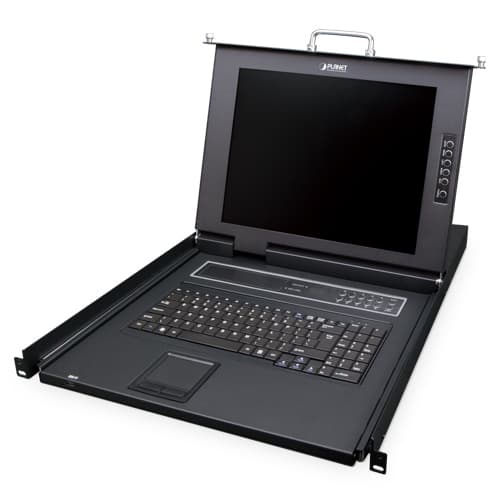
Vista 1 de 4. Selecciona una miniatura para ampliarla.
KVM-210-16M — 17" 16-Port Combo VGA LCD KVM Switch
17" 16-Port Combo VGA LCD KVM Switch
Confirma disponibilidad, instalación y entrega con un asesor.
Descripción
Easy Switching, Efficient Management PLANET KVM-210-16M Combo VGA LCD KVM Switch features an integrated 17" LED-backlit LCD panel allowing access to and control up to 16 computers from a single console (keyboard, mouse and monitor). Simply use the supplied Combo VGA cable set to link the KVM-210-16M to the console ports of your KVM Switch, regardless of the connected interface -- USB or PS/2. Easy to Install With the uniquely separate rail design, it helps to install the KVM console easily. Moreover, when there is a need to maintain the console, the administrator can easily uninstall the device without affecting the server above or below. Computer Switching There are three convenient methods to access any computer connected to the installation: Port select button Hotkeys on keyboard OSD (on screen display) Security Two level password security only authorizes up to one user and an administrator with a separate profile for each user. Powerful Mouse/Keyboard Support In the present computer applications, a mouse has become an indispensable device. The KVM-210-16M fully supports all models of PS/2 mice on the market. The KVM also supports the PS/2 keyboard port of code set 1/2/3 and further allows you to use the KVM for all kinds of servers, computers or their combination. Applications Standalone Operation The KVM-210-16M allows access to and control up to 16 computers from the LCD control platform. Cascade Operation By cascading to 16 KVM switches, it can control up to 256 servers. Key Features Hardware Integrated 17” LCD monitor and keyboard/touchpad module within 1U chassis Standalone machine controls up to 16 sets of computers Up to 2 levels can be cascaded and up to 256 computers can be controlled. Port Select Panel status LEDs give a clear indication of the active computers Supports high resolution up to 1280 x 1024 Mouse touch board with two function buttons Full-size 100-key keyboard with integrated number pad Front panel with lock to prevent damage by accident Security Two-layer password security protection Management Auto scan mode for monitoring computers Requires no additional software or hardware Computer selection via Port Select Button, Hotkey and On Screen Display (OSD) Hot pluggable: Add or remove computers without having to power down the switch QVS (Quick View Setting): Quickly select your computer by naming or SN number Compatibility Multiplatform support -- Windows, Linux and Sun Supports Microsoft Intellimouse, Logitech Net Mouse and all other third party’s PS/2 mice
Especificaciones técnicas
- Number of Ports
- 16
- Maximum
- 256 by cascading (KVM-210-16 x 16)
- PC Ports
- Keyboard: USB Type A female head Mouse: USB Type A female head Video: 16 x VGA DB15 Blue Female Head
- Port Select Panel
- Number Key:10 Reset:1 Enter:1 LED:16 Segment display:1
- LCD Panel
- Monitor 17‘’ SXGA COLOR TFT-LCD Video Resolution 1280 x 1024 @ 60HZ Local Pixel Pitch 0.264 x 0.264 mm Support Color 16.7M colors Contrast Ratio 1000:1 Backlight LED
- LCD Button
- 6
- Console USB Hub Ports
- 3 x USB 2.0 Type A female
- Keyboard
- 100-key chocolate ultra-thin keyboard
- Touch Pad
- 1
- Housing
- Metal
- Dimensions (W x D x H)
- 445 x 544 x 45mm
- Weight
- 10.43kg
- Power Requirement
- 12V DC, 4A
- Installation
- 1U rack-mountable
- PC Selection
- Port select button Hotkeys on keyboard OSD (on screen display)
- Scan Interval
- 3~60 seconds
- Security
- User password and super password
- Operating Temperature
- 0 ~ 50 degrees C
- Storage Temperature
- -20 ~ 60 degrees C
- Operating Humidity
- 0-80% RH, no coagulation
- Regulatory
- CE, FCC